Over Thanksgiving 2012 10 million Thanksgiving-themed photos were shared at a rate of 200 photos per second, according to Instagram’s own blog.
But it’s not just individuals who are using Instagram. Check out these key statistics. In October, Simply Measured released stats showing that 54 percent of major brands are using Instagram for their business.
Before You Begin
1. Grabbing the App

If you’re going to use Instagram effectively, you need a mobile device because it’s only available as an app from Google Play or the Apple App Store. Once you have the app, add a bio, add a profile photo and include a link to your site.
Before you start using it for business, check it out as a personal user – it’s a good time to play with all the features. Instagram doesn’t have brand pages, so whatever you learn will still be useful when you put your business hat on.
Business Tip
For your profile name, choose an account name that’s the same as the Twitter handle of your business.
2. Enabling Notifications
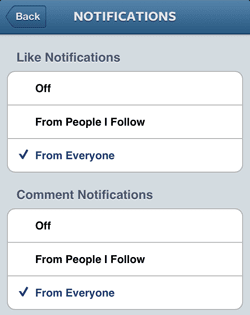
At the start of your Instagram journey, no-one will be talking to or following you.
Business Tip
A key to good business is responding to your customers, enable notifications so you can see when people share or comment on your photos. This will let you engage with them more quickly – just like a lot of companies do on Twitter. You can also use image based responses to show you are taking their communications with you seriously.
3. Adding Social Networks
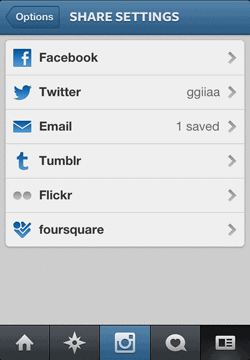
Instagram isn’t just about internal photo love; you can also share your uploads on other social networks. Boosting their reach, and improving the likelihood that you’ll get people responding to them.
Go ahead and link Instagram to Twitter and Facebook (as well as Foursquare, Tumblr and Flickr).
Business Tip
If you have already established a business presence on other social networks, leverage this by sharing what’s going on in your office (e.g. sneak peaks of new product features, and company cultural events) across multiple networks.
Getting Started
4. Editing Photos

The best way to understand Instagram is to see what it can do.
Open the Instagram app to start up your camera or choose a photo from the gallery.
Then give your image the professional touch by using Instagram’s built-in filters. You can brighten colors, change pictures to sepia, enrich the overall look, rotate, crop and change the image focus.
Once you’re happy with your photo, move onto the next step – sharing photos.
Business Tip
Be innovative. One example might be to brand your photos so they all have your logo attached. A simple way to do this would be to have a small printed out logo to hold up (by hand) in the corner of your shot as you take it. This is the business equivalent of those classic photos where people take photos of their feet in exotic locations. Have you seen anyone else do this? Nope. That’s the point. Don’t rely on your profile to extend your brand, make it a part of everything you produce.
5. Sharing Photos
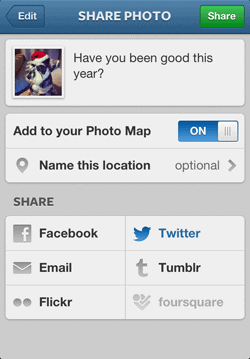
Add a caption to your photo and upload it. A good tip for business users is to ask questions in your captions to increase the possibilities for engagement.
Learn more about Instagram engagement in Tips, Tactics and Best Practices to Improve Your Instagram Life.
Business Tip
As mentioned above, asking questions increases engagement. If you have a brick and mortar business, ask people which locations they’ve visited. If you run an online business, include a URL in the comments that interested viewers copy and paste into their mobile browser. Ideally you’ll want to add a mobile ready landing page for an optimal experience.
6. Using Hashtags

Now that you’ve uploaded your first photo, try it again, but this time, to give your photo more reach – add a hashtag. Hashtags have become part of the social media landscape (not just Twitter).
They are a key tool for organizing your photos and helping Instagram users to find photos on topics that interest them (such as your products). Add hashtags to your captions to see engagement grow. Check out Instagram’s own advice on hashtags for help with this.
Business Tip
Establish a hashtag for your business from the start, so that you can provide consistency and something customers can memorize.
7. Finding Customers
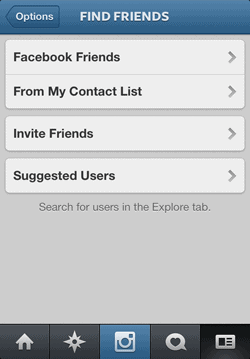
Now that you have a few photos on your Instagram page, find and follow compatible users.
Instagram has a built in tool to help you find people which works particularly well with Facebook.
Business Tip
Again you should rely on hashtags. This time, use them to find people that are discussing/sharing photos relevant to your business. If your Facebook or Twitter followers are busines focused you can search to see if they are on Instagram, broadening your sphere of connectivity with them.
8. Updating out Your Business Profile
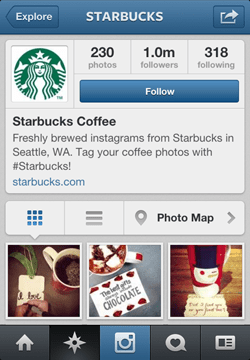
Much to the delight of fans, Instagram recently introduced web profiles.
Yours will be http://instagram.com/[your-username]
Have a look at your profile and see if it represents your brand well, once it does, get sharing this new profile URL.
Business Tip
Add some of your business personality to your profile. This can include having an image of your office or employees, or your logo, rather than personal profiles which often have a photo of the user.
General Tips on Using Instagram
9. Taking Unusual or Cute Photos

To make the most of Instagram, avoid generic, posed photos that have zero personality.
Photos that look like they are taken on the fly or those that are a bit wacky tend to do better.
Cute photos of animals or flowers can work well too (but are probably best saved for times when you need to inject some personality into your brand – or if you sell animals =/.
Business Tip
Many companies use different social networks to create different experiences. LinkedIn for business discussions and lead gen, Twitter for content marketing updates and customer conversations, and Facebook for more fun company culture based updates. Instagram is also perfect to help your Facebook account by capturing funny moments on the fly and push them to Facebook to brighten up your presence there.
10. Posting Strategies

Like other social networks, using Instagram successfully means interacting with others.
That means liking other users’ photos (by double tapping in the app), commenting on them, mentioning them by name when you post something interesting (using @ plus the username) and responding to their comments.
Post consistently, but don’t overdo it: thou shalt not spam! Be authentic and engagement will follow.
Business Tip
If you’ve successfully grown your followers based on customers or leads from your other networks, make sure you engage with them regularly, with comments and likes on their photos, to keep you top of mind.
11. How to Use Location Services
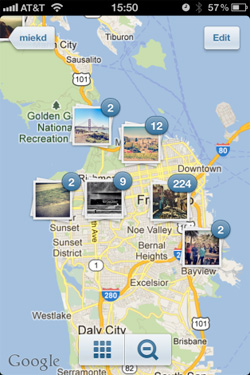
As a business, you probably want to take advantage of local traffic and Instagram works well for this.
Take a photo of your business, tap the ‘where’ field, locate your business and upload your photo.
You can also pin photos to maps (shown opposite). For example showing where people are using your products or services.
This will help you to make local connections.
Business Tip
Bring customers to you. If you make updates based on a geographical location, mention that you’ll be there and to come on down for a free prize giveaway – bringing customers directly to your store.
Instagram and Your Business
12. Promoting Your Business on Instagram

Because it’s so visual, Instagram is an excellent tool for marketing and promoting your business.
Some of the ways you can do this include:
- Hosting a photo contest.
- Documenting the projects you undertake so everyone can see your expertise.
Business Tip
Show context of use: Instead of just using standard shots of your product, try showing people using it to illustrate the benefits of doing so, and that you have a customer base.
13. Improving Customer Service

Instagram can also help you improve what you offer customers. Consider:
- Asking customers to post their own photos of your product or service and then showcasing them.
- Showcasing a ‘behind the scenes’ look at your business, including employees, product development and more.
Business Tip
If you make a mistake, issue a different style of apology, perhaps a photo of your CEO holding a piece of paper saying “I’m Sorry”. Then include a comment with more details and a link to a landing page that has a more formal letter.
Extra Credit
Here are some additional ways to make the most of Instagram for business.
14. Status Updates – Visually

Change the way you think about Instagram to see its possibilities. Recent research showed that teenagers use the site to provide visual status updates. So speak to your customers the way they interact with others in their network.
Business Tip
Have a spot on the wall of your office (like a whiteboard) where you can write details of updates that are happening, then take photos of it to share. The consistency will help let customers know that you have an update coming.
15. Researching Your Customers
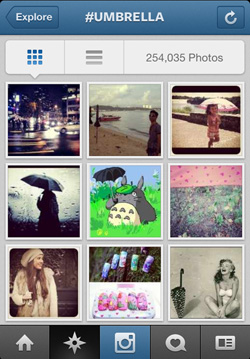
Since your customers also use the caption and tagging features in Instagram, it’s easy for you to search and see who’s already using your product or visiting your business. There is a ready-made fan base for you to interact with.
Business Tip
This is the same as finding customers that was mentioned earlier, except that you are searching based on caption and tagging.
16. Monitoring Your Analytics
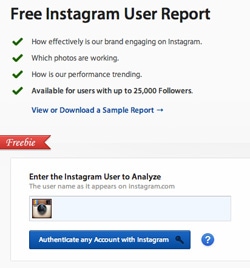
As with any social site, you need to know what people are responding to and how so you need analytics. A good option is the free Instagram Analytics report on Simply Measured.
Business Tip
Like any marketing endeavor, you need to know what your goals are. Is it sales, or increased brand awareness. If it’s a tangible goal such as sales then you need to track and report on it to see if this channel is a viable marketing tool for your company.
17. Read the Instagram Blog

Instagram is constantly updating its offering and also publishes lots of tips and tricks. Check out the Instagram blog to see the latest features you can use in your business.
Business Tip
Whenever a new feature is released, do a Google search to see how others are using it for business. As a rapidly growing company, there are hundreds of bloggers following every step of Pinterest’s growth.
So there you have it – 17 tips to help your business with Instagram. Need more? Check out 5 Key Takeaways from Brands Rocking Instagram.