You might not think a site like Pinterest, where the majority of the users are pinning and sharing recipes, inspirational quotes and other lame things, is the kind of place that you could be marketing your company and that there are ways to optimize how it contributes to your traffic and conversion rates – but you’re wrong.
Acupuncture works….

In case you don’t know what Pinterest is (#ShameOnYou) – there’s a bunch of good Pinterest content on Mashable here. But we’re not going to talk about what it is – just how you should be using it to get better traction from a new inbound channel.
Traffic Factoid
With over 5 million users spending an average of 15 minutes on the site per day, Pinterest has the potential to be a conversion-boosting marketing tool. The fact is, Pinterest now commands a presence that drives more web traffic than Google Plus, YouTube, Reddit, and LinkedIn combined.
But how can you leverage the power of pins to your advantage? Keep reading to find out how corporations, small businesses and everyday users are doing just that – and how you can do it too.
Step 1: Start When You’re Ready
Although I’ve just started on Pinterest myself, I will tell you that it’s worth pinning (and repinning, liking and following other users) steadily rather in quick bursts of activity. It doesn’t bode well for your brand when your Pinterest board looks like a blank slate – just like your dormant Facebook a/c makes you look bad. So if you’re gonna start, make sure you stay Pinterested.
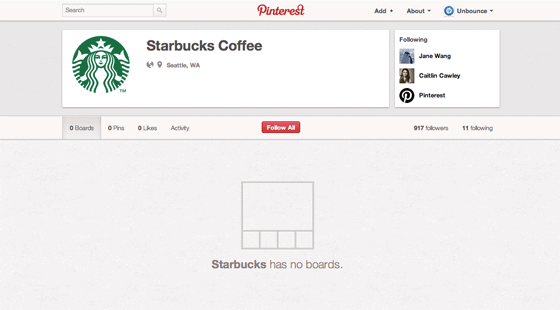
Unlike Facebook and Twitter, which provide equal opportunity outreach for a multitude of brands, increasing conversions with Pinterest will help certain types of businesses more than others. Restaurants, retailers, schools, fashionistas and mommy bloggers have all found something to love about this addictive site – but they’re not the only ones.
Action Steps for Increasing Your Follower Numbers
- Add Pinterest to your social sharing buttons: An obvious first step, add a “Follow me on Pinterest” button and make use of the “Pin This” feature on your website or blog to encourage readers to view and share your work.
- Become a go-to source for the best curated content in your industry: It should go without saying but curating the best content there is for your given subject will make you pretty irresistible on Pinterest.
- Share your pins on other social networks: Spread your reach by linking your Twitter and Facebook accounts to Pinterest and, although pins themselves are only sharable currently, Pinterest is planning to make entire boards embeddable as well.
Step 2: Have a Specific Goal
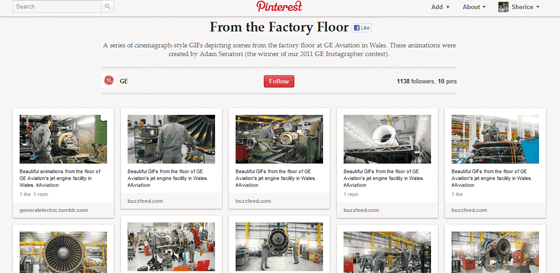
It’s really important to understand each social network you utilize for marketing. Facebook can be for purely social engagement or fun, Twitter for sharing of great content and fast reacting customer service. Pinterest (being predominantly visual) should be used in different ways. People may know you solely for your products or services – but what really goes on behind the scenes? GE created “From the Factory Floor“, a series of animated graphics that showcase aviation jet engines at their facility in Wales.
In the GE example, since Pinterest doesn’t currently support animated images, users have to click through the pins to the actual site to see them (annoying? yes, but Pinterest may figure it out soon – or maybe not – who cares about animated GIFs?). The example shows how they take you from static images to more interesting content. And, although very few Pinterest users are in the market for jet engines, it’s still a great way to start a conversation with fellow Pinners and show them the quality that goes into what you make.
Action Steps for Getting the Most Out of Your Pins
- Pinterest will soon be updating video capability beyond YouTube by including the ability to upload videos from Vimeo, Hulu and Netflix. They’re also looking at ways to make it easier for like-minded users to connect.
- Pinterest is also releasing an iPad app, and working toward releasing its API, so you can expect more Pinterest-enabled products and services to be developed soon.
- To help entice more people to click through your pins, use descriptive “teaser” text and add a link (shortened with something like bit.ly) as a call to action invite readers to visit your site.
- Use your Pins to further increase the stickiness of your site. For instance, if you’ve pinned some inspiration on great summer cocktails, encourage visitors and those who’ve commented and liked the pin to also check out your beach party theme blog post.
Step 3: Become a Person of Pinterest
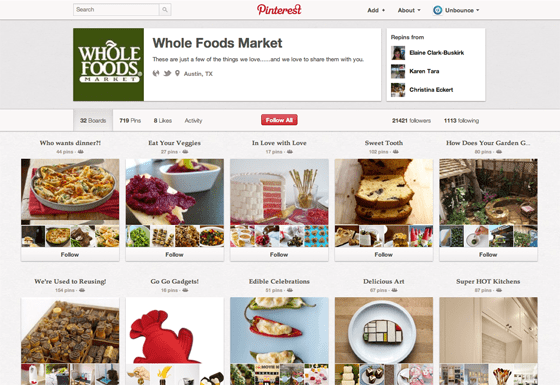
Even if you don’t want to gratuitously promote yourself directly on Pinterest (you shouldn’t), you can still become a “person of Pinterest” (pun intended) by pinning items that are in line with your company goals and mission. Whole Foods does a brilliant job with their pins by having separate boards for a wide range of messages they want to have resonate with their followers and fans.
Rather than pinning up pictures of tasty organic strawberries, they’ve got boards filled with specific recipes such as Eat Your Veggies. By showcasing food as art, Whole Foods has created a way to entertain and inspire its followers in a way that’s authentic to its brand.
Action Steps to Creating Boards Worth Sharing
- Pinterest understands #hashtags – a feature that people aren’t using much (yet). Whenever you upload an image on Pinterest, use hashtags as keywords in your description – such as #gardening, #cheesecake or #funny (just make sure they’re related to your business for maximum effect).
- Think beyond pretty pictures! Use Pinterest as a way to encourage click-throughs by way of coupons, quick tip-sheets, infographics and other visual promotions. Bonus points if you make your coupons a Pinterest exclusive.
- Host a themed “Board” contest and encourage multiple contributors to share. For example, if you’re business promotes diets and exercise, you could have a “Monday Morning Metabolism Rev-Up” themed board and share favorite low-cal, high energy recipes.
Step 4. Invite Community Feedback
RealSimple magazine, which has over 50,000 followers as of this writing, doesn’t just create and post to boards, but invites feedback from its followers as well. This can stir up lively debates, but more often, it creates connections between the pinner and their followers in a more visual, supportive way. For example RealSimple created a board for Problem-Solving Products which has over 81,000 followers:
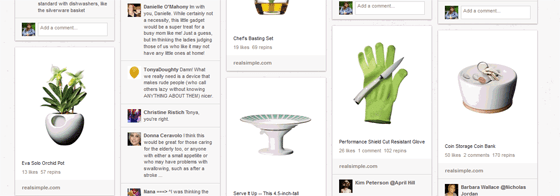
This not only gives RealSimple direct reviews and feedback about the products they showcase, but lets readers spread the word via likes and repins: carrying the best products into the coveted “inner circle” of friends and associates that every marketer dreams of reaching.
A word of warning though — Pinterest users are quick to report a board or user that’s solely focused on self-promotion. Instead, take the time to share, repin and like contributions from others – particularly from other companies who aren’t direct competitors, but may offer a product or service that’s complementary to your own. Industry news, quick tips or hints, and even certain “themed” boards can help boost your viewership considerably.
What Now? Action Items to Encourage Pinterest Click-throughs
Ready to delve into the addictive world of pinning? Here are some tips to not only help you reach more potential customers, but increase click-throughs and conversions to your website using Pinterest.
- If you sell a product online – you can show up in the Pinterest “Gifts” section simply by adding the price (including the currency sign) in the pin description – a genius way to showcase your best sellers on the fastest-growing social network.
- Jason Miles, vice president of marketing at Northwestern University, recommends a process of Observing, Organizing and Optimizing – Watch how the “heavy-hitters” on Pinterest share and promote themselves and others, then organize your own boards around complementary topics.
- Optimize each pin description for better search-ability and conversion. The description of the pin is what appears in the search results. Remember, you’ll want to use something thoughtful, and include a call-to-action link or some hashtags.
How are you using Pinterest to market your business?
