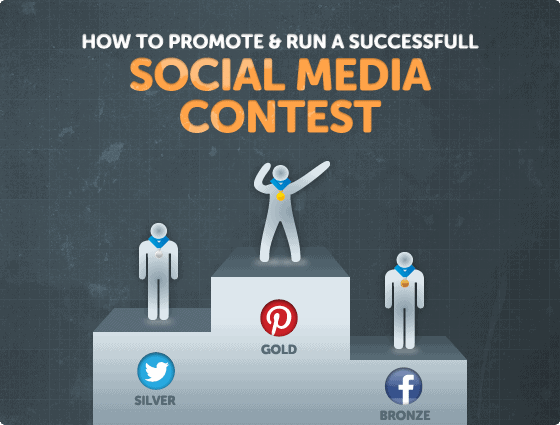
So you’re ready to launch your first social media contest on Twitter, Facebook or Pinterest. This is a great way to engage more with your customers and enhance your online profile. There’s nothing worse than having your competition sink into obscurity.
Here’s a step-by-step guide to social media contest success:
1. Social Contest Ideas by Platform
Here are some examples of the types of contest you could hold on each platform:
Pinterest is primarily a visual site, which makes it great for photo-based contests. Typical Pinterest contests include:
- Pin it to win it – where people pin or repin an image from your site to get an entry – read how to run a pin it to win it promotion
- Pinning sweepstake – where you decide what is to be pinned and users let you have the link to enter a sweepstakes contest
- Photo contest – where followers have to pin an image around a theme
- Comments – where followers comment on your image and you choose a winner at random
- Likes and repins – where users create a board under guidelines and the winner is the person with the most likes or repins
See some good examples of Pinterest contests here.
Twitter works well for the following types of contests:
- Verbal contests – such as those where you have to fill in the blanks, complete a phrase or answer a question.
- Sweepstakes contests – where you tweet or retweet something to enter a draw.
- Retweet to win – like a sweepstake, you would randomly choose a winner, this time from the list of people who retweeted you – it has virality built right in. Despite this, not everyone’s a fan.
With a Twitter contest it is essential to use hashtags and mentions to track contest entries.
More info in Mashable’s HOW TO: Launch a Successful Twitter Contest, and this post from Jeff Bullas blog goes into more depth about the types of Twitter contests.
Facebook works well for some of the same kinds of contests as Pinterest. These include:
- Sweepstakes – make sure you use a Facebook app to prevent getting burned by their strict rules (not to mention the rules governing sweepstakes in different countries and U.S. states). WildeFireApp is great at setting up sweepstakes on Facebook.
- Photo and video contests – posting and sharing photos for likes and comments
- Polls and quizzes – where users answer the question and leave comments
Read this list of successful Facebook contests for more inspiration.
Of course, there’s no reason that you actually have to choose. Many companies allow people to enter the same contest on different social media platforms. Depending on the contest, this might be an option for you.
It’s also important to decide on how the contest will be judged and to make this process transparent in the rules. You might have a panel of judges, a single judge or just pick a winner at random. If the last is your preferred option then you will need a randomizing tool to pick your winners.
2. Don’t Get Banned
Before you decide on a contest and platform, it’s useful to know the rules. Otherwise you could end up banned from the same social site you are trying to use. Here’s a quick guide to the rules on social media promotions.
Of the three platforms, Pinterest has the fewest rules. In fact, the site doesn’t seem to have any contest specific rules at all. Instead, your contest must stick to Pinterest’s general rules. That means:
- Pins and boards that are part of a contest must credit their sources
- Users must be authentic and respectful
You can read the rest of the Pinterest etiquette here.
Twitter’s guidelines for running contests are fairly simple. They include:
- Following the Twitter rules (which means avoiding spam and complying with guidelines relating to trademarks, copyright, privacy and more)
- Discouraging your followers from creating multiple Twitter accounts for the purpose of winning the contest
- Discouraging them from sending the same tweet multiple times
You can read the full list of Twitter contest guidelines here.
Of the three platforms, Facebook has the most stringent rules. As well as complying with all applicable law, people running the contest have to:
- Use permitted Facebook contest and sweepstake apps to run the contest (there’s a good guide on Social Media Examiner)
- Indemnify and disassociate Facebook from the contest
- Avoid using Facebook as the sole consideration for entry into a contest
- Avoid using Facebook for winner notification
Read the full set of Facebook promotions guidelines here.
3. Pick Your Prize and Entry Method
If you want people to enter your contest you need to have a great prize or prizes. It could be related to your business (editor’s note: upgrading your customers etc. although I’ve learned from experience that this can be a little lackluster in terms of inspiration). You can also give people the first chance to try something new. Another approach is to partner with other people and offer a range of prizes. The partnership approach has the advantage that your partners will also help promote your contest.
When it comes to choosing an entry method, remember this rule: The simpler it is to enter your contest and the more places you publicize it, the more likely it is that people will enter it. If entering your contest is too complicated, then it will flop. And if people don’t even know it’s there … ’nuff said!
Before you get on to letting people know about your contest, there are a few more pieces to put in place.
4. Build Your Contest Landing Page
To make a splash with your contest, there are a few elements you need to get ready in advance. These include:
- A attention grabbing title. Pick a name that’s fun and makes people want to share it (we’re talking social contests after all).
- A great graphic to brand your contest. Include the title of your contest in an image of your prize. (Share these with contest partners to place on their sites.)
- Clear details of how to enter. Include dates for entry and ultra simple steps participants need to take.
- Instructions for how to easily share the contest. Make it social! Bonus points if this helps them to win in some way (like getting a double entry).
- Prize details How the winner will be chosen and contacted – this is what people really want to know.
- The fine print: Specify closing dates, limitations and rules.
Contest Landing Page Examples
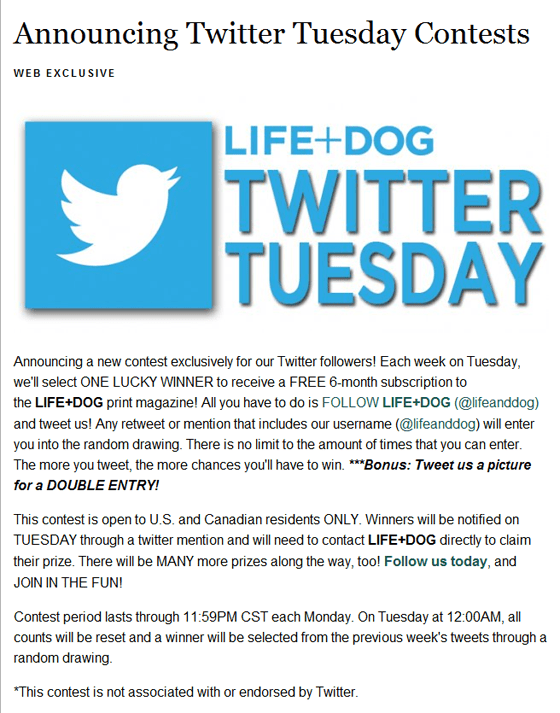
The Life and Dog Twitter Tuesday contest doesn’t have a fancy landing page, but you can tell that it’s a Twitter contest and the main rules are laid out in the post.
The WSS Facebook contest is a better landing page, clearly showing the prize, closing date and some of the rules.

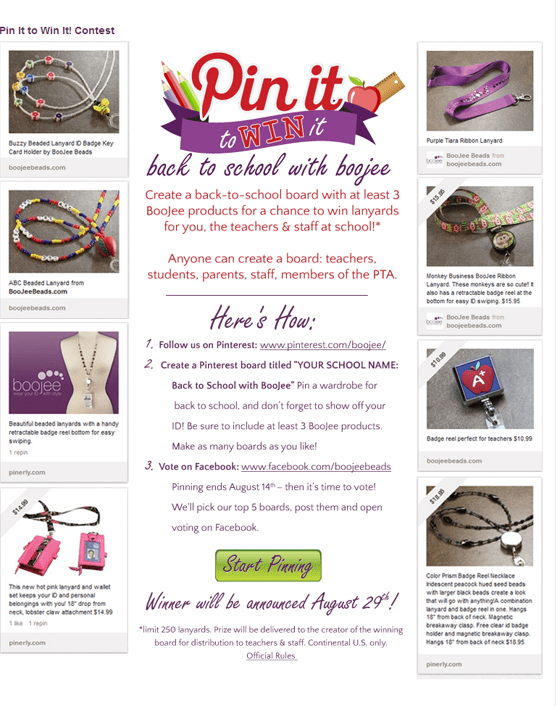
Boojee Beads’ Pinterest contest lets you know what kind of contest it is, uses Pinterest pins as part of the landing page and outlines some of the rules.
5. Promoting Your Contest
With the platform, contest type and landing page all decided, it’s time to promote your contest. Here are some methods to try:
- Create a Facebook ad, promote a wall update or use Facebook events to promote your contest.
- Develop a tweet schedule for the weeks leading up to your Twitter contest deadline increasing frequency as your contest draws to a close – people are forgetful.
- Send out an email to your mailing list encouraging “forward to a friend”.
- Write about your contest on your blog and encourage others to do the same (yet another possible way to gain extra entries).
- Create a contest button or badge and ask others to use it on their blogs if they are entering the contest.
- If it’s a large contest and you have sponsors, feature their badges and encourage them to post about the contest. You can also ask them to promote the contest to their own lists. Be sure to offer links back to their site as a thank you.
- Link to your contest in your email signature (a great way to let a lot of people know about it without too much effort).
- If your prize is large enough (like a car), send out a press release.
- Create a pin for your contest, ask for repins (this could also be a way to enter).
- Add your contest to some of the sites that list and promote new contests. There are many of these sites and two useful relatively up-to-date listings are available on Faithful Bloggers and A Blog of Goodies.
- Don’t forget about off-line promotion too – if you are attending a networking event or have a physical point-of-sale, handing out a flyer can also be a good way to get more interest in your contest.
This article by Jenny Finke looks at ways to promote your Facebook contest but many of these ideas work for any social media platform. Facebook Guru Mari Smith also has some excellent tips and a case study on promoting contests on Facebook.
6. Monitoring Your Contest
Before you start your social media contest you should know what you’re hoping to achieve with it. You may be trying to get more fans or followers on Twitter, Facebook or Pinterest, to build brand awareness or you may have a broader goal of engaging with your followers more. Deciding on this in advance will help you know what type of contest is best for you. Once you know your goals, you need to monitor the contest to see if you are meeting them.
Ways to monitor your contest include:
- Using hashtags and mentions on Twitter
- Looking at likes and comments on and mentions Pinterest, Twitter Facebook
- Set up Google Alerts for mentions of your company, brand or contest
7. Prizegiving and Beyond
Ideally, your contest should have a clearly posted finish date and entrants should know when they will receive the prize. But even when the contest is over, you can still use it for promotion. For example, you can:
- Video the prize draw to create more excitement and show authenticity
- Profile the winner on your blog
- Do a roundup of the best or most interesting contest entries
- Share your plans for a future contest
All of these keep the momentum going and drive more people to your chosen social media platform. Running a social media contest is a great way to engage more with your customers and enhance your online profile.
So what are you waiting for?
